 AXWare Systems - Timing Is EVERYTHING!
 AXWare Systems - Competition Timing Systems!
 AXWare Systems - Timing Is EVERYTHING!
 AXWare Systems - Competition Timing Systems!
 AXWare Systems - Timing Is EVERYTHING!
 AXWare Systems - Competition Timing Systems!
 AXWare Systems - Timing Is EVERYTHING!
AXWareTS - AXWareCorners Android App (networking)
With the introduction of AXWareTS v16.x, we can now offer an integrated solution for entering and management penalties directly from Corner Stations in real time.
Using WIFI, staged vehicle sequences and penalties are sent between the Penalty Manager and AXWareTS Corners Android Application in real time. The penalties are consolidated by the Penalty Manager and sent to the T&S Server.
AXWareDM (the Penalty Manager) you can now off-load penalty data entry and management to another computer, feeing up the T&S Server and reduce the work load of the T&S Persons.
The Penalty Manager provides WIFI connectivity to the AXWareTS Corners Android App at each corner station. The corner stations can then enter penalties directly for vehicles without orchestrating any Radio Chatter and the expediting the penalty process. It is very quick and simple process that reduced the time it takes to enter penalties.
No longer do the corner stations have to wait for timing to response and exchange radio communications (which can take minutes in some cases), and worse with poor radios. With safety in mind, it takes seconds to enter a penalty into the App, versus a much longer time to talk to Timing and validate the penalty verbally. The corner stations can therefore pay closer attention to the action on course.
The cars are continually sequenced with the cars on course at the top of the run list (see below).
Penalty Manager
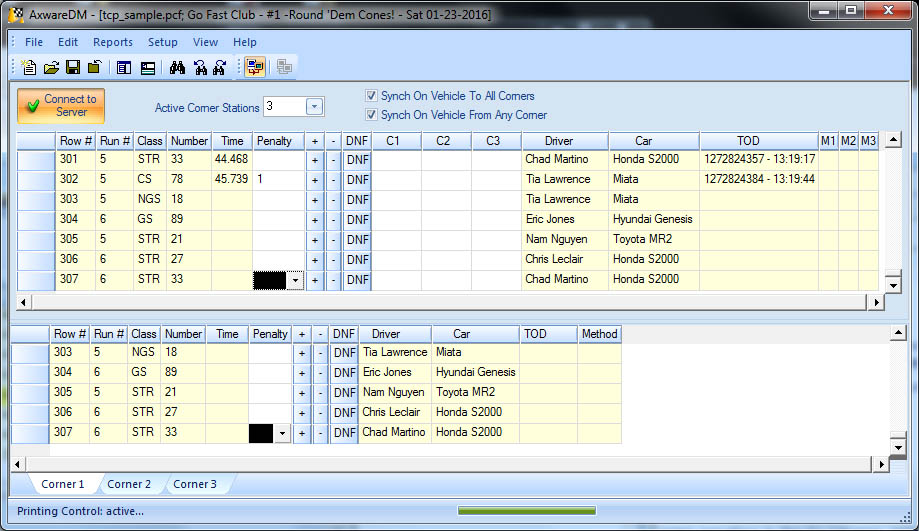
The Penalty Manager (AXWareDM) manages a set of staging grids into which penalties may entered directly or received from the AXWareTS Corners Android Application for the respective corner.
The Penalty Manager receives all of the staging data from the T&S Server similarly to the announcer and audit clients.. It manages this data in 2 main sections in the application allowing flexibility in how you want to view and manage the penalties. Currently up to 6 corner stations are being managed.
-
Main Penalty Grid (Upper grid window) contains consolidated penalty data as well a summary of penalties for all corners. A main penalty column (Penalty) contains the consolidated penalties of all corners, and penalties for each corner in the (C1-C6) columns. You can edit penalties anywhere in this grid or explicitly in any of the corner tabs or let data flow from the AXWareTS Corners App.
-
Corner Grids (Tabbed Corners) show data respect to each corner. Select the tab for the corner you want to manage and enter or view the penalties accordingly.
-
Detailed reports are provide in a summary fashion or for individual corners.
-
We offer the ability to synchronize the row selection between the Main Penalty grid with the Corner Tab Grids to allow position in the grids easier. Select the options you find most helpful.
Below is an example of the AXWareDM screen (set to manage 3 corners).
Penalties
Entering penalties into the Penalty Manager can be done both manually in the Main Penalty Grid or in any of the Corner Tabs. Manual entry can be utilized if you do not require the use of our AXWareTS Corners Station App. It is foreseeable that the Course Radio operator control would handle the data entry, with normal radio traffic still being necessary.
For an efficient, consistence and very quick approach, penalties can be entered directly by Corner Stations using AXWareTS Corners Station App. This requires less time, no radio traffic unless necessary, providing clear and concise recognition and sequencing of vehicles on course. All of the data necessary to identify an vehicle is at the finger tips of the Corner Station.
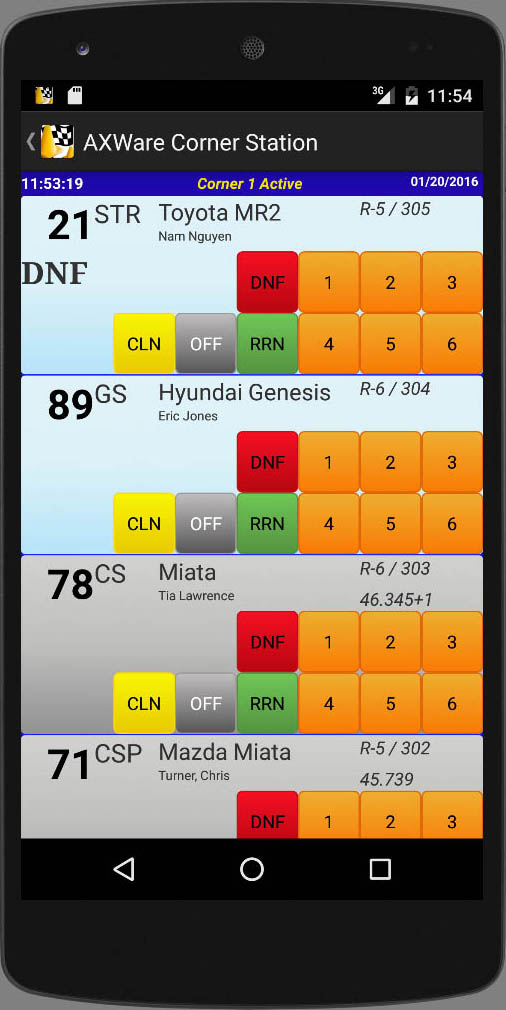
Below is a sample of a live session with AXWareCorners at Corner 1.
Entries in the list represent the stage entries in the exact sequence to that of the T&S Server.
All entries contain the Class and Car Number, car description and driver name. The class, number and description will allow the corner worker to quickly pick the car in the list (drivers may not be known to the corner stations but the name if provided as well).
Entries with a light blue background are either running or staged and will always appear at the top of the list. Completed runs are displayed with a darker gray background, and include the total time and penalty, in addition to the Run number and sequence number.
Penalties are entered by clicking on the specific penalty buttons and can be changed very quickly by pressing the appropriate button. The clear a penalty, the CLN button is used.
In our example: STR 21 below shows that the DNF button was pressed. The penalty is immediately sent to the Penalty Manager, recorded for that corner and sent to the T&S Server in real-time.
Copyright © 2026 - AXWare Systems